QSS 作用域
Qt QSS 不是 CSS,但作用域逻辑非常类似,一共三类:
- 全局样式(Application 级别):作用整个程序,是兜底基础样式,优先级最低,适合统一主题。
- 父容器样式(Widget / Layout 容器):作用当前容器 + 它所有子控件,模块 / 页面级隔离,优先级中等,容易向下渗透造成意外污染。
- 局部控件样式(单个控件实例):只作用这一个控件,优先级最高;是替换而非追加,会冲掉全局和容器上的同规则样式。
 1
 2
 3
 4
 5
 6
 7
 8
 9
10
11
12
13
14
15
16
17
18
19
20
21
22
23
24
25
26
27
28
29
30
31
32
33
34
35
36
37
| import sys
from PySide6.QtWidgets import QApplication, QWidget, QVBoxLayout, QPushButton, QLabel
class MyWindow(QWidget):
def __init__(self):
super().__init__()
self.setWindowTitle("QSS 作用域演示")
self.resize(420, 320)
root = QVBoxLayout(self)
root.addWidget(QLabel("对比三个按钮的颜色来源:"))
# 容器:作用于自身 + 所有子控件(中等优先级)
container = QWidget()
container.setStyleSheet("QPushButton { background: green; color: white; }")
box = QVBoxLayout(container)
box.addWidget(QLabel("容器内:"))
b_in = QPushButton("① 继承容器样式 → 绿")
b_local = QPushButton("② 自身样式 → 红(替换而非追加)")
b_local.setStyleSheet("background: red; color: white;") # 局部:最高优先级,冲掉同规则
box.addWidget(b_in)
box.addWidget(b_local)
root.addWidget(container)
# 容器外:只受全局样式影响(兜底,最低优先级)
b_out = QPushButton("③ 容器外:继承全局 → 蓝")
root.addWidget(b_out)
app = QApplication(sys.argv)
# 全局样式:作用整个程序,兜底基础样式,优先级最低
app.setStyleSheet("QPushButton { background: steelblue; color: white; }")
window = MyWindow()
window.show()
sys.exit(app.exec())
|
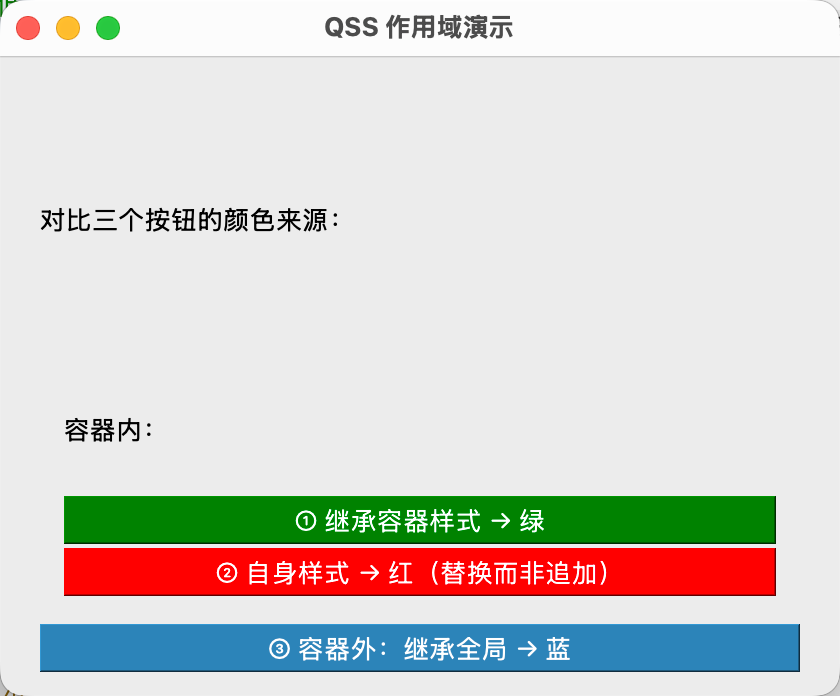
- 容器内按钮 → 绿色(容器样式覆盖全局)
- 容器内+b_local → 红色(控件自身样式最高,且是“替换”上层同规则)
- 容器外按钮 → 蓝色(仅受全局兜底)
演示效果如下:
样式优先级
样式优先级从两个方面考虑:
- 作用域:优先级从低到高,
app.setStyleSheet 全局样式 < 父容器(Widget)setStyleSheet < 控件实例自身 setStyleSheet - 选择器,在同一作用域比较,由低到高:
- 通用选择器
* - 类型选择器(控件类名)
QPushButton - 类选择器
.MyBtn(自定义 class,btn.setProperty("class","MyBtn")) - ID 选择器
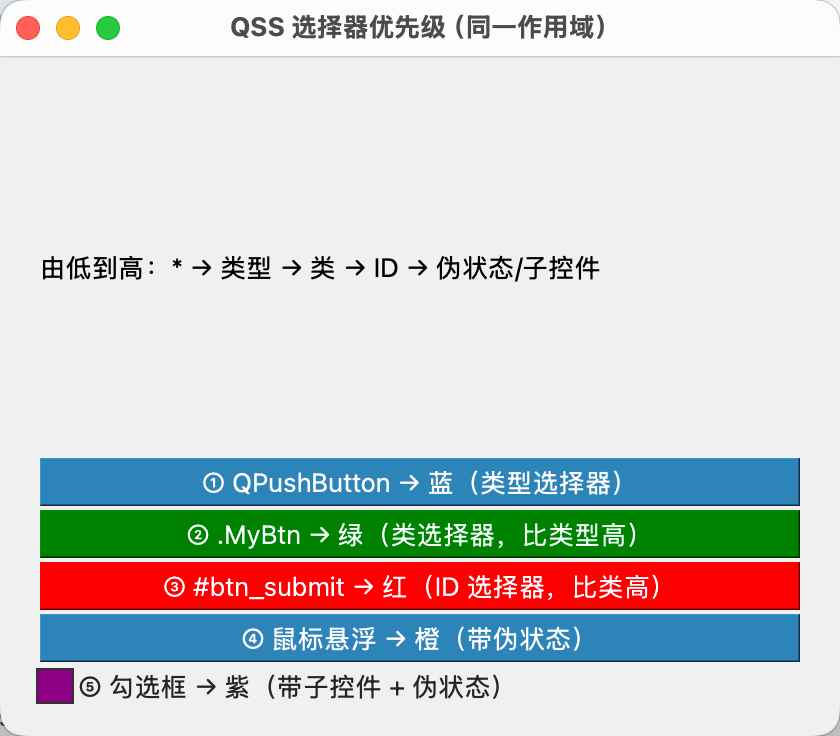
#btn_submit(objectName) - 带伪状态 / 子控件组合:
QPushButton:hover、QCheckBox::indicator:checked
 1
 2
 3
 4
 5
 6
 7
 8
 9
10
11
12
13
14
15
16
17
18
19
20
21
22
23
24
25
26
27
28
29
30
31
32
33
34
35
36
37
38
39
40
41
| import sys
from PySide6.QtWidgets import QApplication, QWidget, QVBoxLayout, QPushButton, QCheckBox, QLabel
class MyWindow(QWidget):
def __init__(self):
super().__init__()
self.setWindowTitle("QSS 选择器优先级(同一作用域)")
self.resize(420, 340)
root = QVBoxLayout(self)
root.addWidget(QLabel("由低到高:* → 类型 → 类 → ID → 伪状态/子控件"))
b1 = QPushButton("① QPushButton → 蓝(类型选择器)")
b2 = QPushButton("② .MyBtn → 绿(类选择器,比类型高)")
b2.setProperty("class", "MyBtn")
b3 = QPushButton("③ #btn_submit → 红(ID 选择器,比类高)")
b3.setObjectName("btn_submit")
b4 = QPushButton("④ 鼠标悬浮 → 橙(带伪状态)")
chk = QCheckBox("⑤ 勾选框 → 紫(带子控件 + 伪状态)")
chk.setChecked(True)
for w in (b1, b2, b3, b4, chk):
root.addWidget(w)
# 同一作用域(本容器)内比较各选择器的优先级
self.setStyleSheet("""
* { background: #f0f0f0; }
QPushButton { background: steelblue; color: white; }
.MyBtn { background: green; }
#btn_submit { background: red; }
QPushButton:hover { background: orange; }
QCheckBox::indicator:checked { background: purple; border: 1px solid #333; }
""")
app = QApplication(sys.argv)
window = MyWindow()
window.show()
sys.exit(app.exec())
|
演示效果如下:
小结
- 作用域:全局(app)< 父容器 < 控件实例,离控件越近优先级越高;且控件自身的
setStyleSheet 是替换而非追加,会直接冲掉上层的同规则样式。 - 选择器:同一作用域内,
* < 类型 < 类 < ID < 伪状态/子控件组合,选择器越具体优先级越高。