5 天学习 Playwright(Day4):文献信息爬取

看了那么多天的 Playwright,准备做一个文献信息爬取,设定的需求如下:

  • 爬取 PubMed 上,查询词为 maize(玉米)的 100 篇文献
  • 要求近 5 年内摘要可访问的文献
  • 单篇文献应该具有以下字段:
    • title(标题)
    • authors(作者),以英文逗号和空格间隔
    • journal(期刊)
    • first affiliation(第一单位)
    • abstract(摘要)
    • pmid(PubMed 文献编号)
    • doi(文献数字对象标识)
    • publish date(发表日期)
    • pubmed_url(详情地址)
  • 按 publish date 降序排列

思路

  • 打开列表页,每页 10 个文献,爬取文献的标题和详情页地址(10 次)
  • 遍历获得的 100 个文献及详情页地址
  • 从详情页获取其它信息
  • 全部信息获取完毕后,保存至 CSV 文件

编码

编写用于存储数据的模型和将模式数据写入 CSV 的方法:

 1
 2
 3
 4
 5
 6
 7
 8
 9
10
11
12
13
14
15
16
17
class Publication(BaseModel):
    title: str
    authors: typing.Optional[str] = None
    journal: typing.Optional[str] = None
    first_affiliation: typing.Optional[str] = None
    abstract: typing.Optional[str] = None
    pmid: typing.Optional[str] = None
    doi: typing.Optional[str] = None
    publish_date: typing.Optional[str] = None
    pubmed_url: str

def save_publications(publications: typing.List[Publication], file: str):
    with open(file, 'w', newline='', encoding='utf-8') as f:
        writer = csv.writer(f)
        writer.writerow(publications[0].model_dump().keys())
        for publication in publications:
            writer.writerow(publication.model_dump().values())

因为是先获取标题和详情页地址,所以其余属性设置为 Optional。

列表页的信息获取,要遍历

 1
 2
 3
 4
 5
 6
 7
 8
 9
10
11
12
13
14
15
16
17
18
19
20
21
22
23
24
25
26
27
28
29
30
31
32
33
34
35
36
37
38
39
async def run(query: str, *, size: int, save_to: str):
    base_url = 'https://pubmed.ncbi.nlm.nih.gov/'
    async with async_playwright() as p:
        browser: Browser = await p.chromium.launch(headless=True)
        context: BrowserContext = await browser.new_context()
        page: Page = await context.new_page()

        print('开始获取文献基本信息(标题、详情地址)')
        publications = []
        for page_num in range(1, size // 10 + 1):
            print(f'获取第{page_num}页文献基本信息(标题、详情地址)')
            # term 查询关键词
            # sort 排序方式,pubdate 表示按出版日期排序
            # page 页码
            # filter=simsearch1.fha 表示文献要摘要可访问
            # filter=datesearch.y_5 表示搜索范围为近 5 年文献
            await page.goto(f'{base_url}?term={query}&sort=pubdate&page={page_num}&filter=simsearch1.fha&filter=datesearch.y_5')

            title_eles = await page.query_selector_all('article a.docsum-title')
            for title_ele in title_eles:
                title = await title_ele.text_content()
                href = await title_ele.get_attribute('href')
                publications.append(Publication(
                    title=title.strip(),
                    # [1:] 去掉第一个字符,因为第一个字符是 /
                    pubmed_url=f'{base_url}{href.strip()[1:]}',
                ))            
    
        print('获取文献基本信息(标题、详情地址)完成')

        print('开始获取文献详细信息(作者、期刊、摘要、PMID、DOI、出版日期)')
        for index, publication in enumerate(publications):
            print(f'获取第{index + 1}条文献详细信息(作者、期刊、摘要、PMID、DOI、出版日期)')
            await fullfill_publication(publication)
        print('获取文献详细信息(作者、期刊、摘要、PMID、DOI、出版日期)完成')

        save_publications(publications, save_to)

        await browser.close()

其中详情信息获取的 fullfill_publication 实现如下:

 1
 2
 3
 4
 5
 6
 7
 8
 9
10
11
12
13
14
15
16
17
18
19
20
21
22
23
24
25
26
27
28
29
30
31
32
33
34
35
36
37
38
async def fullfill_publication(publication: Publication):
    async with async_playwright() as p:
        browser: Browser = await p.chromium.launch(headless=False)
        context: BrowserContext = await browser.new_context()
        page: Page = await context.new_page()

        await page.goto(publication.pubmed_url)
        await page.wait_for_load_state('networkidle')

        # 取 authors
        author_eles = await page.query_selector_all('span.authors-list-item a.full-name')
        publication.authors = ', '.join([await author_ele.text_content() for author_ele in author_eles])

        # 取 journal
        journal_ele = await page.wait_for_selector('#full-view-journal-trigger', timeout=15000)
        publication.journal = (await journal_ele.text_content()).strip()

        # 取 first_affiliation
        await page.locator('#toggle-authors').click()
        first_affiliation_ele = page.locator('#full-view-affiliation-1')
        # [2:] 去掉前两个字符,因为前两个字符是 "1 "
        publication.first_affiliation = (await first_affiliation_ele.text_content()).strip()[2:]

        # 取 abstract
        abstract_ele = await page.query_selector('#eng-abstract')
        publication.abstract = (await abstract_ele.text_content()).strip()

        # 取 pmid
        pmid_ele = await page.query_selector('#full-view-identifiers strong.current-id')
        publication.pmid = (await pmid_ele.text_content()).strip()

        # 取 doi
        doi_ele = await page.query_selector('a[data-ga-action="DOI"]')
        publication.doi = (await doi_ele.text_content()).strip()

        # 取 publish_date
        publish_date_ele = await page.query_selector('span.cit')
        publication.publish_date = (await publish_date_ele.text_content()).strip().split(';')[0]

程序的执行入口:

 1
 2
 3
 4
 5
 6
 7
 8
 9
10
11
12
13
if __name__ == '__main__':
    start_time = time.time()
    size = 100
    save_to = 'publications.csv'

    asyncio.run(run(
        'maize',
        size=size,
        save_to=save_to,
    ))

    end_time = time.time()
    print(f'耗时:{end_time - start_time} 秒')

执行效果

执行命令:

1
$ python python get_publications_by_pubmed.py

总耗时 1007s,约 17 分钟。

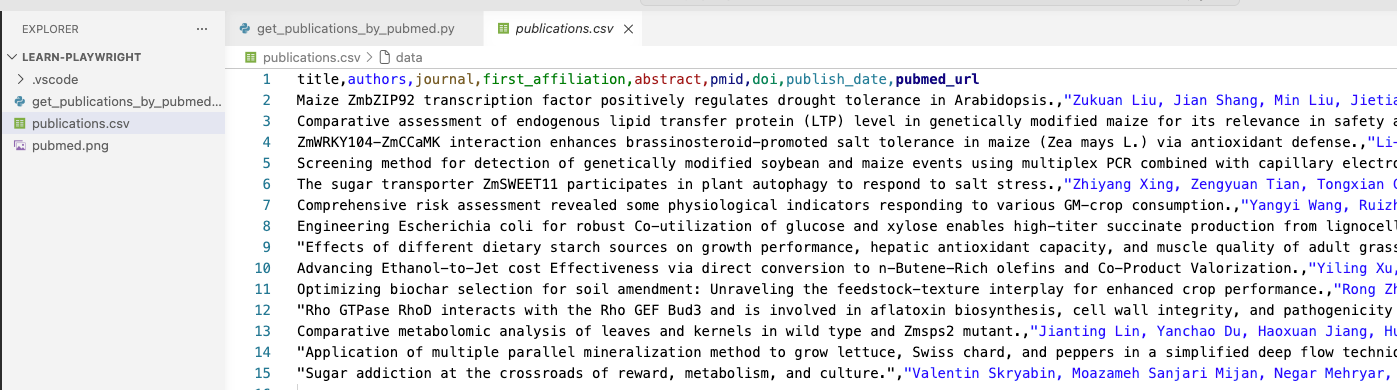
CSV 内容如:

完整代码

  1
  2
  3
  4
  5
  6
  7
  8
  9
 10
 11
 12
 13
 14
 15
 16
 17
 18
 19
 20
 21
 22
 23
 24
 25
 26
 27
 28
 29
 30
 31
 32
 33
 34
 35
 36
 37
 38
 39
 40
 41
 42
 43
 44
 45
 46
 47
 48
 49
 50
 51
 52
 53
 54
 55
 56
 57
 58
 59
 60
 61
 62
 63
 64
 65
 66
 67
 68
 69
 70
 71
 72
 73
 74
 75
 76
 77
 78
 79
 80
 81
 82
 83
 84
 85
 86
 87
 88
 89
 90
 91
 92
 93
 94
 95
 96
 97
 98
 99
100
101
102
103
104
105
106
107
108
109
110
111
112
113
114
115
116
117
118
119
import asyncio
import typing
import csv
import time

from pydantic import BaseModel
from playwright.async_api import async_playwright, Browser, Page, BrowserContext

class Publication(BaseModel):
    title: str
    authors: typing.Optional[str] = None
    journal: typing.Optional[str] = None
    first_affiliation: typing.Optional[str] = None
    abstract: typing.Optional[str] = None
    pmid: typing.Optional[str] = None
    doi: typing.Optional[str] = None
    publish_date: typing.Optional[str] = None
    pubmed_url: str

def save_publications(publications: typing.List[Publication], file: str):
    with open(file, 'w', newline='', encoding='utf-8') as f:
        writer = csv.writer(f)
        writer.writerow(publications[0].model_dump().keys())
        for publication in publications:
            writer.writerow(publication.model_dump().values())

async def fullfill_publication(publication: Publication):
    async with async_playwright() as p:
        browser: Browser = await p.chromium.launch(headless=False)
        context: BrowserContext = await browser.new_context()
        page: Page = await context.new_page()

        await page.goto(publication.pubmed_url)
        await page.wait_for_load_state('networkidle')

        # 取 authors
        author_eles = await page.query_selector_all('span.authors-list-item a.full-name')
        publication.authors = ', '.join([await author_ele.text_content() for author_ele in author_eles])

        # 取 journal
        journal_ele = await page.wait_for_selector('#full-view-journal-trigger', timeout=15000)
        publication.journal = (await journal_ele.text_content()).strip()

        # 取 first_affiliation
        await page.locator('#toggle-authors').click()
        first_affiliation_ele = page.locator('#full-view-affiliation-1')
        # [2:] 去掉前两个字符,因为前两个字符是 "1 "
        publication.first_affiliation = (await first_affiliation_ele.text_content()).strip()[2:]

        # 取 abstract
        abstract_ele = await page.query_selector('#eng-abstract')
        publication.abstract = (await abstract_ele.text_content()).strip()

        # 取 pmid
        pmid_ele = await page.query_selector('#full-view-identifiers strong.current-id')
        publication.pmid = (await pmid_ele.text_content()).strip()

        # 取 doi
        doi_ele = await page.query_selector('a[data-ga-action="DOI"]')
        publication.doi = (await doi_ele.text_content()).strip()

        # 取 publish_date
        publish_date_ele = await page.query_selector('span.cit')
        publication.publish_date = (await publish_date_ele.text_content()).strip().split(';')[0]


async def run(query: str, *, size: int, save_to: str):
    base_url = 'https://pubmed.ncbi.nlm.nih.gov/'
    async with async_playwright() as p:
        browser: Browser = await p.chromium.launch(headless=True)
        context: BrowserContext = await browser.new_context()
        page: Page = await context.new_page()

        print('开始获取文献基本信息(标题、详情地址)')
        publications = []
        for page_num in range(1, size // 10 + 1):
            print(f'获取第{page_num}页文献基本信息(标题、详情地址)')
            # term 查询关键词
            # sort 排序方式,pubdate 表示按出版日期排序
            # page 页码
            # filter=simsearch1.fha 表示文献要摘要可访问
            # filter=datesearch.y_5 表示搜索范围为近 5 年文献
            await page.goto(f'{base_url}?term={query}&sort=pubdate&page={page_num}&filter=simsearch1.fha&filter=datesearch.y_5')

            title_eles = await page.query_selector_all('article a.docsum-title')
            for title_ele in title_eles:
                title = await title_ele.text_content()
                href = await title_ele.get_attribute('href')
                publications.append(Publication(
                    title=title.strip(),
                    # [1:] 去掉第一个字符,因为第一个字符是 /
                    pubmed_url=f'{base_url}{href.strip()[1:]}',
                ))            
    
        print('获取文献基本信息(标题、详情地址)完成')

        print('开始获取文献详细信息(作者、期刊、摘要、PMID、DOI、出版日期)')
        for index, publication in enumerate(publications):
            print(f'获取第{index + 1}条文献详细信息(作者、期刊、摘要、PMID、DOI、出版日期)')
            await fullfill_publication(publication)
        print('获取文献详细信息(作者、期刊、摘要、PMID、DOI、出版日期)完成')

        save_publications(publications, save_to)

        await browser.close()

if __name__ == '__main__':
    start_time = time.time()
    size = 100
    save_to = 'publications.csv'

    asyncio.run(run(
        'maize',
        size=size,
        save_to=save_to,
    ))

    end_time = time.time()
    print(f'耗时:{end_time - start_time} 秒')

问题及改进

上面的代码有两个问题:

  1. 当 headless 为 True 时,即启用无头模式时,总是会找不到元素,查了相关资料也一真无法解决
    1. 一说是:无头模式的浏览器行为与有头模式不一样
    2. 一说是:要等网络活动停止,使用 wait_ 相关 API,仍无法正常执行
  2. 执行时间较长,如 100 个文献就要 17 分,1000 个则要 170,将近 3 小时

改进

问题 1,我试了很多方法,依然无法解决。

问题 2,引入多线程,一个线程处理一个批次的文献(获取详情),让多个线程同时执行。

时间上的消耗主要还在于浏览器的打开与关闭,所以问题 1 不解决,整体的耗时依然会较长。