插槽(<slot>)是 Vue 组件体系中核心的内容分发机制,其核心作用是允许父组件向子组件传递任意模板片段,子组件可在指定位置渲染这些片段,让组件的结构复用与定制化变得更加灵活。
基础使用:默认插槽
默认插槽是最基础的插槽形式,子组件通过 <slot> 标签标记内容分发的位置,父组件在使用子组件时,嵌套的内容会自动填充到这个位置。
子组件定义
 1
 2
 3
 4
 5
 6
 7
 8
 9
10
11
12
13
14
15
| <!-- 子组件 ChildComponent.vue -->
<template>
<div class="child-container">
<h3>子组件区域</h3>
<!-- 插槽占位符 -->
<slot></slot>
</div>
</template>
<style scoped>
.child-container {
padding: 16px;
border: 1px solid #eee;
}
</style>
|
父组件使用
 1
 2
 3
 4
 5
 6
 7
 8
 9
10
11
12
13
14
15
16
17
18
19
20
| <!-- 父组件 ParentComponent.vue -->
<template>
<div class="parent-container">
<h2>父组件区域</h2>
<ChildComponent>
<!-- 传递给子组件的模板片段 -->
<p>这是父组件传递给子组件的内容</p>
</ChildComponent>
</div>
</template>
<script setup>
import ChildComponent from './ChildComponent.vue'
</script>
<style scoped>
.parent-container {
margin: 20px;
}
</style>
|
后备方案:默认内容
当父组件未给插槽传递任何内容时,子组件可以为插槽设置默认内容(后备内容),提升组件的可用性。
子组件定义
 1
 2
 3
 4
 5
 6
 7
 8
 9
10
| <!-- 子组件 ChildWithDefault.vue -->
<template>
<div class="child-container">
<h3>带默认内容的子组件</h3>
<slot>
<!-- 插槽默认内容 -->
<p>暂无自定义内容(默认文案)</p>
</slot>
</div>
</template>
|
父组件使用
 1
 2
 3
 4
 5
 6
 7
 8
 9
10
11
12
13
| <!-- 父组件 -->
<template>
<div>
<h2>父组件</h2>
<!-- 未传递内容,渲染默认值 -->
<ChildWithDefault />
<!-- 传递内容,覆盖默认值 -->
<ChildWithDefault>
<p>自定义内容,替换默认文案</p>
</ChildWithDefault>
</div>
</template>
|
多区域分发:具名插槽
当子组件需要多个不同位置的内容分发点时,可通过 name 属性为插槽命名(具名插槽),父组件可精准为指定插槽传递内容。
核心规则
- 子组件:
<slot name="插槽名"></slot> 定义具名插槽; - 父组件:通过
<template v-slot:插槽名> 或简写 <template #插槽名> 绑定对应插槽; - 未命名的插槽默认名称为
default,父组件中所有顶级非 <template> 节点都会归入默认插槽。
子组件定义
 1
 2
 3
 4
 5
 6
 7
 8
 9
10
11
12
13
14
15
16
17
18
19
20
21
22
23
24
25
26
27
28
29
30
31
| <!-- 子组件 NamedSlotChild.vue -->
<template>
<div class="layout">
<header>
<!-- 头部插槽 -->
<slot name="header"></slot>
</header>
<main>
<!-- 默认插槽 -->
<slot></slot>
</main>
<footer>
<!-- 底部插槽 -->
<slot name="footer"></slot>
</footer>
</div>
</template>
<style scoped>
.layout {
display: flex;
flex-direction: column;
gap: 10px;
padding: 16px;
border: 1px solid #eee;
}
header, footer {
padding: 8px;
background: #f5f5f5;
}
</style>
|
父组件使用
 1
 2
 3
 4
 5
 6
 7
 8
 9
10
11
12
13
14
15
16
17
| <!-- 父组件 -->
<template>
<NamedSlotChild>
<!-- 默认插槽内容 -->
<p>这是主体内容(默认插槽)</p>
<!-- 具名插槽:header -->
<template #header>
<h1>页面标题(头部插槽)</h1>
</template>
<!-- 具名插槽:footer -->
<template #footer>
<p>版权信息(底部插槽)</p>
</template>
</NamedSlotChild>
</template>
|
按需渲染:条件插槽
通过 $slots 对象判断指定插槽是否有内容传递,结合 v-if 实现插槽的条件渲染,避免空插槽占用布局空间。
子组件定义
 1
 2
 3
 4
 5
 6
 7
 8
 9
10
11
12
13
14
15
16
17
18
19
20
21
22
23
| <!-- 子组件 ConditionalSlotChild.vue -->
<template>
<div class="child-container">
<h3>条件渲染插槽</h3>
<!-- 默认插槽 -->
<slot></slot>
<!-- 仅当left插槽有内容时渲染 -->
<slot v-if="$slots.left" name="left" class="slot-left"></slot>
<!-- 仅当right插槽有内容时渲染 -->
<slot v-if="$slots.right" name="right" class="slot-right"></slot>
</div>
</template>
<style scoped>
.slot-left, .slot-right {
display: inline-block;
margin: 0 10px;
padding: 8px;
background: #f0f8ff;
}
</style>
|
父组件使用
 1
 2
 3
 4
 5
 6
 7
 8
 9
10
| <!-- 父组件 -->
<template>
<ConditionalSlotChild>
<p>默认内容</p>
<!-- 仅传递left插槽,right插槽不会渲染 -->
<template #left>
<p>左侧内容(按需渲染)</p>
</template>
</ConditionalSlotChild>
</template>
|
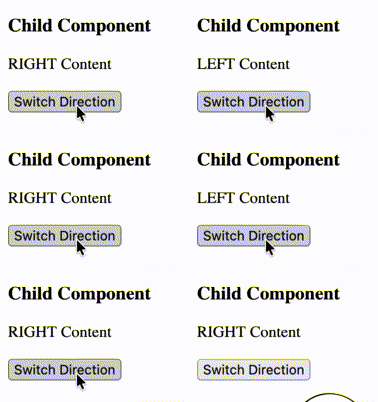
灵活适配:动态插槽
插槽名称可通过变量动态绑定,实现插槽内容的动态切换,适用于交互性强的场景。
子组件定义
1
2
3
4
5
6
7
8
| <!-- 子组件 DynamicSlotChild.vue -->
<template>
<div class="child-container">
<h3>动态插槽演示</h3>
<slot name="left"></slot>
<slot name="right"></slot>
</div>
</template>
|
父组件使用
 1
 2
 3
 4
 5
 6
 7
 8
 9
10
11
12
13
14
15
16
17
18
19
20
21
22
23
24
25
26
27
| <!-- 父组件 -->
<template>
<div>
<DynamicSlotChild>
<!-- 动态绑定插槽名 -->
<template #[direction]>
<p>{{ direction.toUpperCase() }} 区域内容</p>
</template>
</DynamicSlotChild>
<!-- 切换插槽名的按钮 -->
<button
@click="direction = direction === 'left' ? 'right' : 'left'"
style="margin-top: 10px; padding: 6px 12px;"
>
切换显示 {{ direction === 'left' ? '右侧' : '左侧' }} 内容
</button>
</div>
</template>
<script setup>
import { ref } from 'vue'
import DynamicSlotChild from './DynamicSlotChild.vue'
// 定义动态插槽名变量
const direction = ref('left')
</script>
|

跨组件通信:插槽Props
父组件提供的插槽内容默认无法访问子组件的内部状态,通过「插槽Props」可让子组件向插槽传递数据,实现父组件插槽内容访问子组件状态。
核心逻辑
- 子组件:在
<slot> 上绑定属性(如 <slot :数据名="数据值">),这些属性会成为插槽Props; - 父组件:通过
v-slot="插槽Props对象" 接收子组件传递的Props,解构后即可使用。
子组件定义
 1
 2
 3
 4
 5
 6
 7
 8
 9
10
11
12
13
14
15
16
17
18
19
| <!-- 子组件 SlotPropsChild.vue -->
<template>
<div class="child-container">
<h3>子组件</h3>
<!-- 绑定插槽Props -->
<slot
:message="childMessage"
:count="childCount"
></slot>
</div>
</template>
<script setup>
import { ref } from 'vue'
// 子组件内部状态
const childMessage = ref('来自子组件的问候')
const childCount = ref(100)
</script>
|
父组件使用
 1
 2
 3
 4
 5
 6
 7
 8
 9
10
11
12
13
14
15
16
17
| <!-- 父组件 -->
<template>
<div>
<h2>父组件</h2>
<!-- 接收插槽Props并解构 -->
<SlotPropsChild v-slot="{ message, count }">
<p>子组件传递的消息:{{ message }}</p>
<p>子组件传递的数值:{{ count }}</p>
</SlotPropsChild>
<!-- 也可自定义Props对象名称 -->
<SlotPropsChild v-slot="slotProps">
<p>消息:{{ slotProps.message }}</p>
<p>数值:{{ slotProps.count }}</p>
</SlotPropsChild>
</div>
</template>
|
参考资料